Skip to content

Self-hosted alternatives to Mermaid Chart

Mermaid Chart is a hosted diagramming tool from the team behind Mermaid.js, with a code editor, a visual editor, AI generation and collaboration. One listed app does its main job and runs in your own Cloudflare account.

Each answer comes from the app’s README and source code, compared with the features Mermaid Chart describes on its own site.

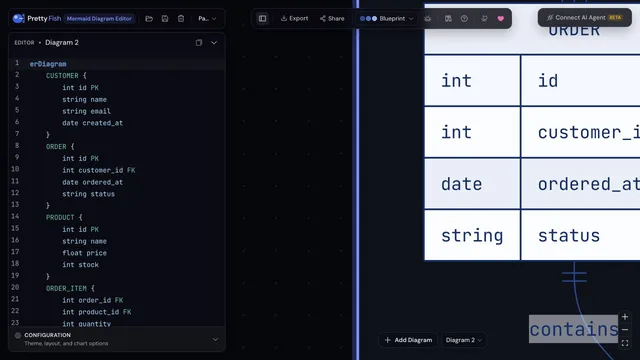
  • Pretty Fish editor with Mermaid ER diagram source on the left and the rendered ORDER entity on the canvas

    Mermaid diagram workspace with live preview, an infinite canvas and multi-page projects, served from your own Worker

    Deploy
    CLI
    License
    Apache-2.0
    GitHub stars
    81 stars
    Last commit

Mermaid Chart features, app by app

FeaturePretty Fish
Mermaid code editor with live previewYes
Many diagram types such as flowchart, sequence, ER and GanttYes
Visual editor to adjust diagrams without writing codeNo
AI diagram generation from prompts or documentsPartly
Real-time collaboration and share linksPartly
Revision historyPartly
Export to PNG, SVG and Mermaid sourceYes
Presentation modeYes

Mermaid diagram workspace with live preview, an infinite canvas and multi-page projects, served from your own Worker

What a Mermaid Chart user would miss
It has no built-in AI generation, no visual editor, no live collaboration and no saved revision history, and the shipped code sends page views and usage events to the maintainer's PostHog host until src/lib/analytics.ts is changed.
What it adds
Several diagrams can sit on one infinite canvas and be grouped into multi-page projects, and the app works offline as a PWA from your own Worker.
  • Yes Mermaid code editor with live preview. Mermaid source with a live preview, using Mermaid 11.
  • Yes Many diagram types such as flowchart, sequence, ER and Gantt. Templates for 20 diagram types including flowchart, sequence, class, ER, state, Gantt, mindmap, timeline and kanban.
  • No Visual editor to adjust diagrams without writing code. No visual node editing found; the canvas arranges whole diagrams and edits happen in the code editor.
  • Partly AI diagram generation from prompts or documents. No built-in AI prompt; an MCP client can edit diagrams in an open browser tab through the hosted relay.
  • Partly Real-time collaboration and share links. Share links encode the diagram in the URL; no live co-editing or accounts found.
  • Partly Revision history. Undo and redo history within a session; no saved revision history found.
  • Yes Export to PNG, SVG and Mermaid source. SVG, PNG and Mermaid source export.
  • Yes Presentation mode. A presentation mode is listed in the README and present in the source.

Sources:github.com/pastelsky/prettyfish#what-it-doespretty.fishmermaid.ai/docs