Skip to content

Self-hosted alternatives to Coggle

Coggle is a hosted tool for drawing mind maps and flowcharts in the browser, with real-time collaboration and sharing by link. One listed app does its main job and runs in your own Cloudflare account.

Each answer comes from the app’s README and source code, compared with the features Coggle describes on its own site.

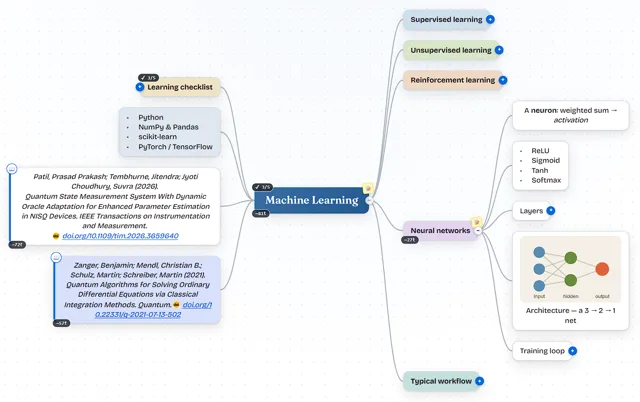
  • MindSpark mind map about machine learning with colored branches, a learning checklist, two citations and an embedded network diagram

    Mind-mapping app with a two-way Markdown editor that saves maps to a private GitHub, Gitea or GitLab repository

    Deploy
    CLI
    License
    MIT
    GitHub stars
    151 stars
    Last commit

Coggle features, app by app

FeatureMindSpark
Mind maps and flowcharts with loops, joined branches and multiple starting pointsPartly
Real-time collaboration with chatPartly
Sharing by link or QR code, with editing by secret link and no loginPartly
Full change history with copies from any pointYes
Image uploads, floating text and a library of iconsPartly
Automatic arrangement of branchesYes
Export to PDF, image, .mm, text and Visio, and import of .mm and textPartly
Embedding mind maps in other pagesNo

Mind-mapping app with a two-way Markdown editor that saves maps to a private GitHub, Gitea or GitLab repository

Who it suits
Coggle users who draw maps for notes, study and planning and are comfortable with maps saved as JSON files in a private GitHub, Gitea, Forgejo or GitLab repository.
What a Coggle user would miss
It has no flowchart shapes, floating text, chat, QR sharing, embedding or Visio export, and live collaboration needs a second Worker and GitHub sign-in.
What it adds
Maps are plain files in the user's own Git repository, Markdown is a native two-way format, and nodes can hold formulas, LaTeX math and citations.
  • Partly Mind maps and flowcharts with loops, joined branches and multiple starting points. Cross-links draw dotted connectors between any two nodes; one central topic per map and no flowchart shapes found.
  • Partly Real-time collaboration with chat. Live merge with editor and viewer roles, but it needs the optional collaboration Worker and sign-in with GitHub; no chat found.
  • Partly Sharing by link or QR code, with editing by secret link and no login. Read-only #view= links open without an account, and editable #shared= links need the collaboration Worker; no QR code found.
  • Yes Full change history with copies from any point. Version history that shows added, removed and edited nodes and restores older versions.
  • Partly Image uploads, floating text and a library of icons. Images inside nodes, 12 marker badges and custom emoji; no floating text or large icon library found.
  • Yes Automatic arrangement of branches. Live auto-layout keeps nodes from overlapping, with Balanced, Right, Left and Down layouts.
  • Partly Export to PDF, image, .mm, text and Visio, and import of .mm and text. Exports PDF, PNG, Markdown and text and imports .mm, OPML, Markdown and text; no .mm or Visio export found.
  • No Embedding mind maps in other pages. No embed code or iframe option found; share links open in MindSpark.

Sources:github.com/prasadpatil25/mindspark#featuresgithub.com/prasadpatil25/MindSpark/blob/main/public/app.jscoggle.it/