
Skip to content

Self-hosted alternatives to Evernote

Evernote is a hosted note-taking app for notes, tasks, calendar events, web clips and scanned documents, with web, desktop and mobile apps. Two listed apps do its main job and run in your own Cloudflare account.

Each answer comes from the app’s README and source code, compared with the features Evernote describes on its own site.

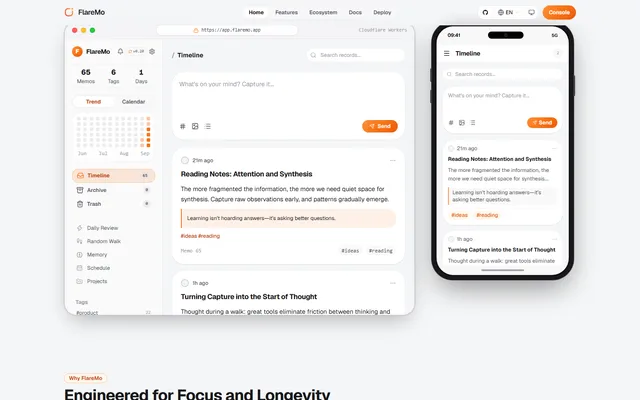
  • FlareMo timeline on desktop and phone with the note composer, a note with a highlighted quote, its tags, and counters for memos, tags and days

    Memos-style quick notes and a shared team knowledge base, with semantic search and long-term memory for AI agents
    Deploy
    One-click
    License
    AGPL-3.0
    GitHub stars
    303 stars
    Last commit
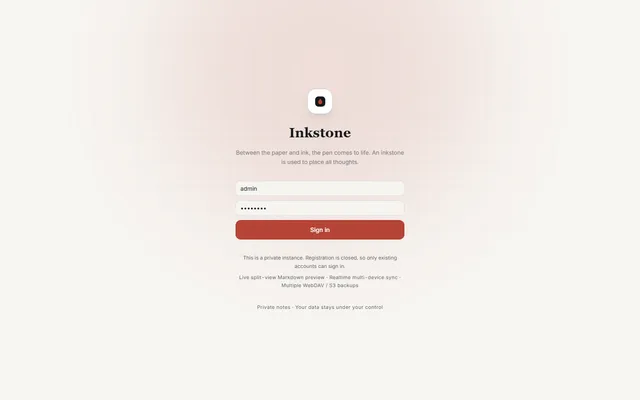
  • Inkstone public demo sign-in screen with the demo account filled in

    Private Markdown notebook with backlinks, offline sync, MCP access and WebDAV or S3 backups, running on Workers

    Deploy
    Manual
    License
    LGPL-3.0-only
    GitHub stars
    1.1k stars
    Last commit

Evernote features, app by app

FeatureFlareMoInkstone
Notes organized in notebooks, spaces, tags and templatesPartlyPartly
Search, including text inside images and documentsPartlyPartly
Tasks with due dates and remindersPartlyPartly
Web Clipper for pages, articles and PDFsNoNo
Sharing notes and real-time collaborationPartlyPartly
Document and business card scanningNoNo
Calendar linked to notesPartlyNo
Sync across desktop, web and mobile appsPartlyPartly

Memos-style quick notes and a shared team knowledge base, with semantic search and long-term memory for AI agents

Who it suits
Evernote users who mostly capture short notes and to-dos and share some of them with a small team.
What a Evernote user would miss
It has no web clipper, no scanning, no notebooks or templates and no real-time co-editing, and it has no native apps.
What it adds
It keeps long-term memory for AI coding agents through a CLI and MCP endpoints, imports from Memos and flomo, and runs on one Worker with D1, R2 and Vectorize in your own account.
  • Partly Notes organized in notebooks, spaces, tags and templates. Tags, pinned and archived notes, and projects that group tasks; no notebooks, spaces or note templates found.
  • Partly Search, including text inside images and documents. Full-text search with operators such as has:attachment and before:, plus semantic search; no text recognition inside images found.
  • Partly Tasks with due dates and reminders. Projects hold tasks on a kanban board with priorities and due dates, overdue tasks raise in-app notices with optional Web Push, and a task can link back to its note; no recurring tasks found.
  • No Web Clipper for pages, articles and PDFs. No browser clipper found.
  • Partly Sharing notes and real-time collaboration. Team mode with owner, admin and member roles, team-visible notes, public share links and time-limited reader seats; no real-time co-editing found.
  • No Document and business card scanning. No scanning or text recognition found; image and audio attachments and live voice capture only.
  • Partly Calendar linked to notes. A month calendar beside overdue and due-today tasks and a Daily Review of notes from the same day; no link to external calendars.
  • Partly Sync across desktop, web and mobile apps. Installable PWA with an offline write queue, and the Memos-compatible API works with clients such as Moe Memos; no native apps of its own.

Sources:github.com/realchendahuang/flaremo#readmegithub.com/realchendahuang/FlareMo/blob/main/docs/en/team-mode.mdevernote.com/features

Private Markdown notebook with backlinks, offline sync, MCP access and WebDAV or S3 backups, running on Workers

Who it suits
People who keep personal notes mostly as text and want them in plain Markdown with backlinks and offline editing, for example writers and researchers who used Evernote as a private notebook.
What a Evernote user would miss
It has no web clipper, no document scanning, no due dates or reminders and no calendar, shared notes are read-only public links, and no importer for Evernote export files was found.
What it adds
Notes stay as plain Markdown with backlinks, math and Mermaid diagrams, a private MCP server lets AI clients read and write notes, and backups can run on a schedule to WebDAV or S3.
  • Partly Notes organized in notebooks, spaces, tags and templates. Nested folders, inline tags, favorites, pinning and archive; no spaces or note templates found.
  • Partly Search, including text inside images and documents. Full-text search of note text with filters and optional semantic search; no search inside images or attachments found.
  • Partly Tasks with due dates and reminders. GFM task lists with checkboxes in notes; no due dates or reminders found.
  • No Web Clipper for pages, articles and PDFs. No browser clipper found; notes are typed, pasted or added through the private MCP server.
  • Partly Sharing notes and real-time collaboration. Public note links with optional password and expiry; no co-editing or comments found.
  • No Document and business card scanning. No scanning or text recognition found; attachments are stored as files.
  • No Calendar linked to notes. No calendar view or event links found.
  • Partly Sync across desktop, web and mobile apps. Installable PWA with an offline write queue and realtime change notices between devices; no native apps.

Sources:github.com/shuaiplus/inkstone#readmegithub.com/shuaiplus/inkstone/blob/main/src/worker/routes/share.tsevernote.com/features