Skip to content

Self-hosted alternatives to LTX Studio

LTX Studio is a hosted AI platform for video production that turns scripts, text, images and video into scenes, storyboards and clips. One listed app does its main job and runs in your own Cloudflare account.

Each answer comes from the app’s README and source code, compared with the features LTX Studio describes on its own site.

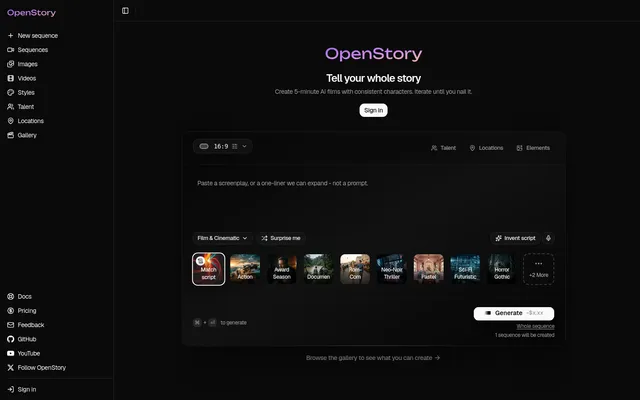
  • OpenStory new-sequence screen with a script box, aspect ratio picker and style presets such as Action and Neo-Noir

    AI studio that turns a written script into scenes with consistent characters, motion clips and audio

    Deploy
    One-click
    License
    MIT
    GitHub stars
    658 stars
    Last commit

LTX Studio features, app by app

FeatureOpenStory
Script-to-video with automatic scenes and storyboardYes
Text-to-image and text-to-video generationPartly
Image-to-videoYes
Camera and keyframe controlsPartly
Consistent characters, objects and locationsYes
Preset visual stylesYes
Timeline editor and sound designPartly
Team collaborationNo

AI studio that turns a written script into scenes with consistent characters, motion clips and audio

What a LTX Studio user would miss
A timeline editor, keyframe controls, direct text-to-video and team workspaces; generation uses paid fal.ai and OpenRouter keys, and server-side MP4 export uses a Container that the repository declares only for its production environment.
What it adds
MIT licensed and deployed to your own Cloudflare account, with a choice of image, motion and music models from fal.ai and an option to post finished renders to social networks through Upload-Post.
  • Yes Script-to-video with automatic scenes and storyboard. A pasted script is analyzed into scenes with camera angles, mood and continuity, then rendered as frames, motion clips, music and dialogue.
  • Partly Text-to-image and text-to-video generation. Scene images are generated from text through fal.ai models; video comes from animating those stills, and direct text-to-video was not found in the docs.
  • Yes Image-to-video. Motion models animate the generated still frames into video clips, with batch generation and draft previews.
  • Partly Camera and keyframe controls. The scene breakdown assigns camera angles and each shot has an editable motion prompt for camera movement; no keyframe editor found.
  • Yes Consistent characters, objects and locations. Characters, locations, color palettes and lighting carry across scenes, with character and location sheets.
  • Yes Preset visual styles. A style catalog of preset looks that shapes prompts and script enhancement.
  • Partly Timeline editor and sound design. Music, sound effects and dialogue audio, scene regeneration, and a Theatre tab that merges clips with the music track for MP4 export; no timeline editor found.
  • No Team collaboration. The README lists team workspaces as coming soon.

Sources:github.com/openstory-so/openstoryopenstory.soltx.io/studio