Skip to content

Self-hosted alternatives to MindMeister

MindMeister is a hosted mind mapping tool for building, sharing and presenting mind maps in the browser and on mobile. One listed app does its main job and runs in your own Cloudflare account.

Each answer comes from the app’s README and source code, compared with the features MindMeister describes on its own site.

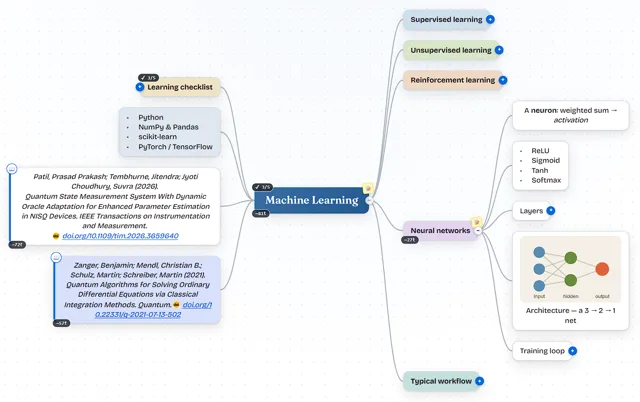
  • MindSpark mind map about machine learning with colored branches, a learning checklist, two citations and an embedded network diagram

    Mind-mapping app with a two-way Markdown editor that saves maps to a private GitHub, Gitea or GitLab repository

    Deploy
    CLI
    License
    MIT
    GitHub stars
    151 stars
    Last commit

MindMeister features, app by app

FeatureMindSpark
Drag and drop mind map editing with collapsible branchesYes
Notes, links, icons and images on topicsPartly
Layouts and themes, including org chart and outline viewsYes
Real-time collaboration with link sharing and commentsPartly
Presentation modeYes
Export to PDF, Word and PowerPointPartly
AI mind map generation from prompts or filesPartly
Access on web, tablet and mobilePartly

Mind-mapping app with a two-way Markdown editor that saves maps to a private GitHub, Gitea or GitLab repository

What a MindMeister user would miss
It has no PowerPoint export, no built-in AI map generation, no comments and no native apps, and live collaboration needs a second Worker and GitHub sign-in.
What it adds
Maps are saved as JSON files in the user's own private GitHub, Gitea, Forgejo or GitLab repository (or in SQLite when run with node server.js) instead of on a vendor server, Markdown is a native two-way format, and MindMeister .mind files can be imported.
  • Yes Drag and drop mind map editing with collapsible branches. Infinite canvas with keyboard-first editing, drag-and-drop reordering and nesting, and incremental collapse and expand.
  • Partly Notes, links, icons and images on topics. Nodes hold notes, links, images and citations plus 12 marker badges; no icon or emoji library found.
  • Yes Layouts and themes, including org chart and outline views. Balanced, Right, Left and Down (org-chart style) layouts, 10 color themes and a two-way Markdown outline editor.
  • Partly Real-time collaboration with link sharing and comments. Live merge, editor and viewer roles and share links exist, but they need the separate optional collaboration Worker and GitHub sign-in; no comment feature found.
  • Yes Presentation mode. Presentation mode is listed in the README.
  • Partly Export to PDF, Word and PowerPoint. Exports to PNG, PDF, JSON, Markdown, Word (.doc) and Mermaid; no PowerPoint export found.
  • Partly AI mind map generation from prompts or files. No prompt-to-map feature in the app; a separate Custom GPT and an MCP server create maps outside it, and branches can be compiled into prompts.
  • Partly Access on web, tablet and mobile. Browser app with touch support for phones and tablets; no native apps.

Sources:github.com/prasadpatil25/mindspark#featureswww.mindmeister.com