Skip to content

Self-hosted alternatives to OneDrive

OneDrive is Microsoft's cloud storage service for files and photos, with web, desktop and mobile apps that sync across devices. Two listed apps do its main job and run in your own Cloudflare account.

Each answer comes from the app’s README and source code, compared with the features OneDrive describes on its own site.

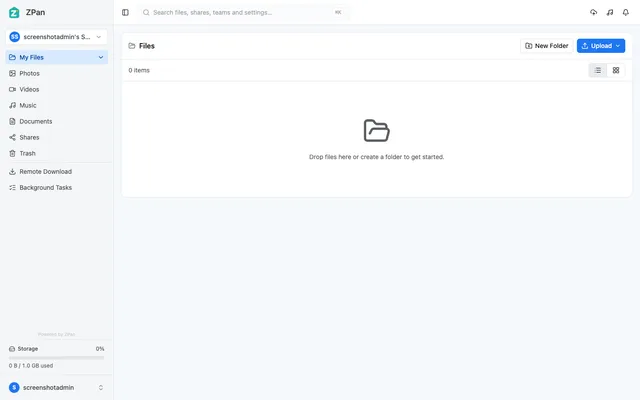
  • ZPan file browser with media filters, shares, trash, remote download and a storage quota bar

    Web drive and image host for your own S3-compatible bucket, with share links, WebDAV and team spaces
    Deploy
    Manual
    License
    AGPL-3.0
    GitHub stars
    2.1k stars
    Last commit
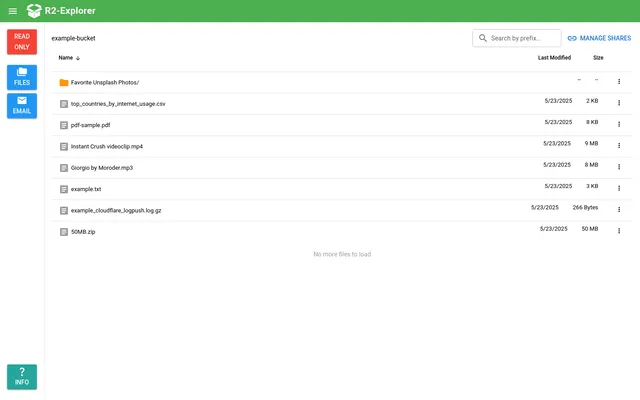
  • R2-Explorer demo listing an R2 bucket's folder and files with dates and sizes, in read-only mode

    Google Drive-style file manager for an R2 bucket, with uploads, previews and password-protected share links

    Deploy
    One-click
    License
    MIT
    GitHub stars
    651 stars
    Last commit

OneDrive features, app by app

FeatureZPanR2-Explorer
Files and photos stored online and opened from a browser, phone or tabletPartlyPartly
Desktop sync of local folders with Files On-DemandNoNo
Backup of the Documents, Pictures and Desktop foldersNoNo
Automatic photo upload from phonesNoNo
Sharing files and folders by link or with chosen peopleYesPartly
Recovery of deleted files and ransomware recoveryPartlyNo
Personal Vault for extra-protected filesNoNo
Photo browsing and search in the browserPartlyPartly

Web drive and image host for your own S3-compatible bucket, with share links, WebDAV and team spaces

Who it suits
Individuals and small teams who used OneDrive mainly to store and share files from a browser and want the files in their own S3-compatible bucket.
What a OneDrive user would miss
Desktop folder sync, folder backup, phone photo upload, a Personal Vault and version history, and the files live in a separate S3-compatible bucket.
What it adds
Browsers upload straight to the bucket through presigned URLs, the drive works as an image host for tools such as PicGo and ShareX, mounts over WebDAV and has team spaces with quotas.
  • Partly Files and photos stored online and opened from a browser, phone or tablet. Web drive with folders, previews and search on your own S3-compatible bucket, with a responsive layout; no native phone or tablet apps.
  • No Desktop sync of local folders with Files On-Demand. Dedicated sync clients are listed as planned; WebDAV mounts the drive but does not sync a folder.
  • No Backup of the Documents, Pictures and Desktop folders. No folder backup client found.
  • No Automatic photo upload from phones. No camera upload found; image tools such as PicGo and ShareX can upload through the image host.
  • Yes Sharing files and folders by link or with chosen people. Share links with password, expiry and download limit, directed shares to registered users, and team spaces with editor and viewer roles.
  • Partly Recovery of deleted files and ransomware recovery. Trash with restore and purge; no version history or ransomware recovery found.
  • No Personal Vault for extra-protected files. No separately locked area found.
  • Partly Photo browsing and search in the browser. A Photos file-type filter and image previews; no photo albums found.

Sources:github.com/saltbo/zpan#readmegithub.com/saltbo/zpan/blob/main/docs/design/spaces-quota-sharing.mdsupport.microsoft.com/en-us/onedrive

Google Drive-style file manager for an R2 bucket, with uploads, previews and password-protected share links

Who it suits
OneDrive users who only need a web file manager with share links for files kept in their own R2 bucket.
What a OneDrive user would miss
It has no sync client, folder backup, phone photo upload, trash or version history, shares single files only, and the one-click template starts read-only without sign-in until it is configured.
What it adds
It also receives email through Cloudflare Email Routing and shows messages with attachments, edits text files in place and edits object metadata.
  • Partly Files and photos stored online and opened from a browser, phone or tablet. Browser file manager for R2 buckets with drag-and-drop and multipart upload and in-browser preview; no native phone or tablet apps.
  • No Desktop sync of local folders with Files On-Demand. No sync client found.
  • No Backup of the Documents, Pictures and Desktop folders. No folder backup client found.
  • No Automatic photo upload from phones. No camera upload found.
  • Partly Sharing files and folders by link or with chosen people. A share link publishes one file at a public URL with optional password, expiry and download limit; no folder or named-person sharing found.
  • No Recovery of deleted files and ransomware recovery. No trash or restore found in the source.
  • No Personal Vault for extra-protected files. No separately locked area; access is protected as a whole by Basic Auth or Cloudflare Access.
  • Partly Photo browsing and search in the browser. Images, PDFs, text, Markdown and CSV preview in the browser and search by file name prefix; no thumbnails or photo albums, and thumbnails are on the README roadmap.

Sources:github.com/g4brym/r2-explorer#key-featuresr2explorer.comsupport.microsoft.com/en-us/onedrive