Skip to content

Self-hosted alternatives to Pingdom

Pingdom is a hosted website monitoring service from SolarWinds that checks uptime, page speed and multi-step transactions from test servers around the world. Two listed apps do its main job and run in your own Cloudflare account.

Each answer comes from the app’s README and source code, compared with the features Pingdom describes on its own site.

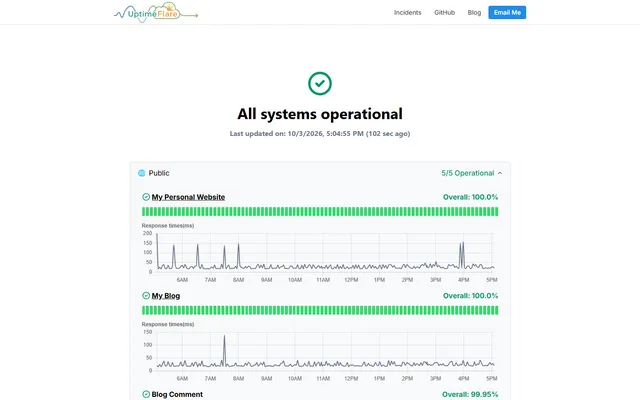
  • UptimeFlare status page reporting all systems operational, with daily uptime bars and response-time charts

    Serverless uptime monitor and status page with HTTP, TCP and keyword checks, deployed through GitHub Actions
    Deploy
    Manual
    License
    Apache-2.0
    GitHub stars
    3.9k stars
    Last commit
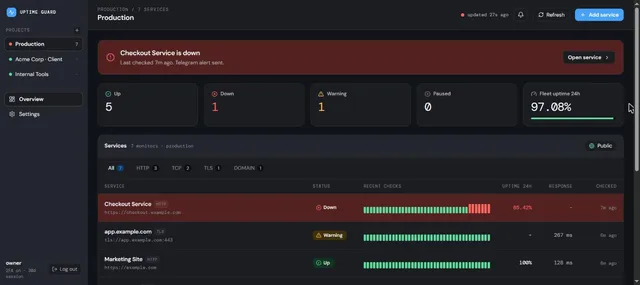
  • Uptime Guard dashboard for a Production project with one service down, one warning and the recent checks of each service

    Uptime monitor for websites, ports, DNS, certificates and cron jobs, with Telegram alerts and public status pages

    Deploy
    One-click
    License
    MIT
    GitHub stars
    29 stars
    Last commit

Pingdom features, app by app

FeatureUptimeFlareUptime Guard
Uptime monitoring of websites, applications and serversYesYes
Checks from multiple global locationsPartlyNo
Alerts by SMS, email, push and webhook, rechecked before alertingPartlyPartly
Uptime and response time reportsYesYes
Public status pagesYesPartly
Transaction monitoring of multi-step flowsNoPartly
Page speed monitoringNoNo
Real user monitoringNoNo

Serverless uptime monitor and status page with HTTP, TCP and keyword checks, deployed through GitHub Actions

What a Pingdom user would miss
It has no combined multi-location checks, no transaction, page speed or real user monitoring, and alerts go only through webhooks.
What it adds
A monitor can run from a chosen region and the status page can be served on your own domain, with data kept in your Cloudflare account.
  • Yes Uptime monitoring of websites, applications and servers. HTTP(S) and TCP port checks; no ICMP ping.
  • Partly Checks from multiple global locations. A monitor can run from one chosen region through a check proxy that you set up.
  • Partly Alerts by SMS, email, push and webhook, rechecked before alerting. Webhook alerts with a grace period before notifying; no built-in SMS or email.
  • Yes Uptime and response time reports. Uptime percentage, 90-day history and response time charts.
  • Yes Public status pages. Public status page with groups, incident history and maintenance notices.
  • No Transaction monitoring of multi-step flows. Each monitor sends a single request.
  • No Page speed monitoring. No page load timing.
  • No Real user monitoring. No real user monitoring.

Sources:github.com/lyc8503/uptimeflare#featuresgithub.com/lyc8503/UptimeFlare/blob/main/uptime.config.tsgithub.com/lyc8503/UptimeFlare/wiki/Setup-notification

Uptime monitor for websites, ports, DNS, certificates and cron jobs, with Telegram alerts and public status pages

What a Pingdom user would miss
It has no multi-location checks, no page speed or real user monitoring, no browser based transactions and no SMS or email alerts.
What it adds
Data stays in your Cloudflare account and the app itself has no per-monitor pricing, though Cloudflare usage applies.
  • Yes Uptime monitoring of websites, applications and servers. HTTP, TCP port, DNS, TLS certificate, domain expiry and heartbeat checks; no ICMP ping.
  • No Checks from multiple global locations. Checks run from the Worker with no location choice.
  • Partly Alerts by SMS, email, push and webhook, rechecked before alerting. Telegram and Web Push only; a failed check is retried twice, 3 seconds apart, before it counts as down.
  • Yes Uptime and response time reports. 24 hour, 7 day, 30 day and 90 day uptime, latency chart, incident history and mean time to recovery.
  • Partly Public status pages. Read-only public page with each monitor's status and 90-day uptime.
  • Partly Transaction monitoring of multi-step flows. Script monitors chain up to 10 HTTP requests with captured values and assertions; no real browser.
  • No Page speed monitoring. No page load timing.
  • No Real user monitoring. No real user monitoring.

Sources:github.com/calmray-solutions/uptime-guard#readmegithub.com/calmray-solutions/uptime-guard/blob/main/worker/src/checks.tsgithub.com/calmray-solutions/uptime-guard/blob/main/worker/src/index.ts