Skip to content

Self-hosted alternatives to XMind

Xmind is a mind mapping and brainstorming app for desktop, web and mobile, with AI map generation, an outliner, project views and team collaboration. One listed app does its main job and runs in your own Cloudflare account.

Each answer comes from the app’s README and source code, compared with the features XMind describes on its own site.

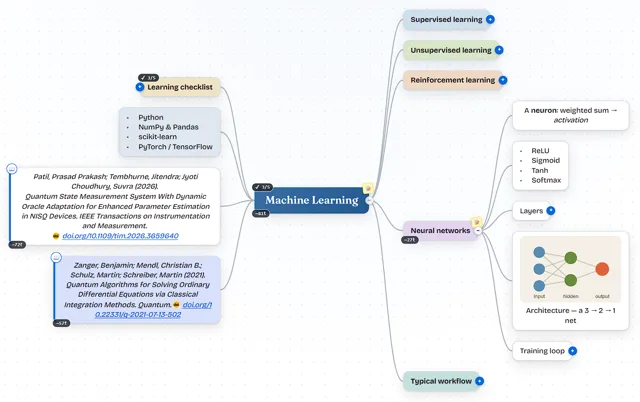
  • MindSpark mind map about machine learning with colored branches, a learning checklist, two citations and an embedded network diagram

    Mind-mapping app with a two-way Markdown editor that saves maps to a private GitHub, Gitea or GitLab repository

    Deploy
    CLI
    License
    MIT
    GitHub stars
    151 stars
    Last commit

XMind features, app by app

FeatureMindSpark
Several map structures such as mind maps, timelines and matricesPartly
Notes, labels, markers, links and attachments on topicsPartly
Outliner view alongside the mapYes
Themes and custom stylesYes
AI map generationPartly
Real-time collaboration and team spacesPartly
Tasks and Gantt project planningPartly
Export to PDF, PNG and other formatsYes

Mind-mapping app with a two-way Markdown editor that saves maps to a private GitHub, Gitea or GitLab repository

What a XMind user would miss
It cannot open .xmind files (import covers JSON, OPML, Markdown, GitMind and MindMeister), has no timeline, matrix or Gantt views and has no native desktop or mobile apps.
What it adds
Maps are saved as JSON in the user's own private git repository, or in SQLite when self-hosted, and nodes can hold LaTeX math, Excel-style formulas and citations with DOI autofill.
  • Partly Several map structures such as mind maps, timelines and matrices. Balanced, Right, Left and Down layouts only; no timeline or matrix structure found.
  • Partly Notes, labels, markers, links and attachments on topics. Notes, links, images, citations and 12 marker badges; no labels, attachments or audio notes found.
  • Yes Outliner view alongside the map. Markdown mode edits the map as a text outline that stays in sync both ways.
  • Yes Themes and custom styles. 10 built-in color themes set per node or per map.
  • Partly AI map generation. No prompt-to-map feature in the app; a separate Custom GPT and an MCP server create maps outside it, and branches can be compiled into prompts for your own Anthropic or OpenAI key.
  • Partly Real-time collaboration and team spaces. Live collaboration and roles need the optional collaboration Worker and GitHub sign-in.
  • Partly Tasks and Gantt project planning. Nodes carry task progress; no Gantt or scheduling found.
  • Yes Export to PDF, PNG and other formats. PNG, PDF, JSON, Markdown, Word (.doc) and Mermaid.

Sources:github.com/prasadpatil25/mindspark#featuresxmind.com/features