Skip to content

Self-hosted alternatives to Google Authenticator

Google Authenticator is Google's app that generates one-time verification codes for sites and apps that support authenticator app 2-Step Verification. Two listed apps do its main job and run in your own Cloudflare account.

Each answer comes from the app’s README and source code, compared with the features Google Authenticator describes on its own site.

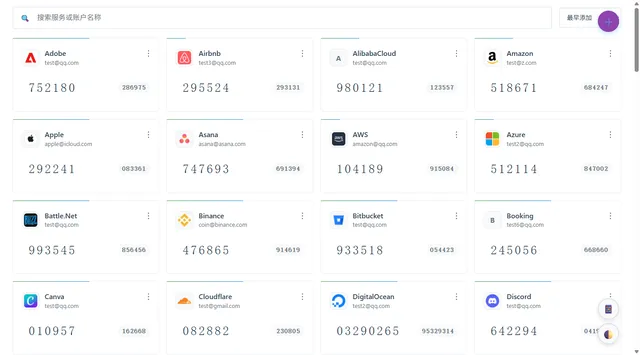
  • 2FA desktop view in Chinese with a search bar above a four-column grid of account cards, each showing its current code

    Self-hosted TOTP and HOTP code manager with imports from other authenticators, cloud backups and browser extensions
    Deploy
    One-click
    License
    MIT
    GitHub stars
    449 stars
    Last commit
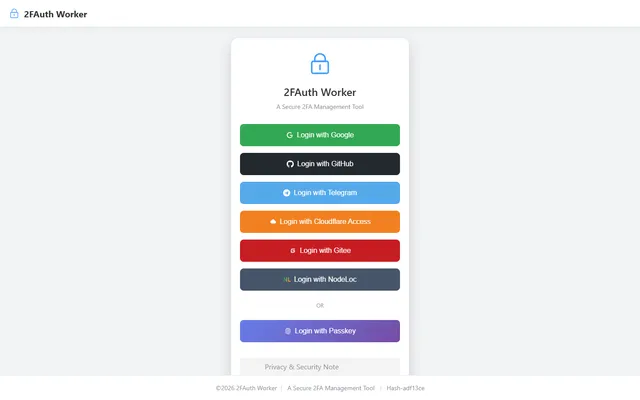
  • 2FAuth Worker sign-in screen on the public demo, offering several login providers and passkey sign-in

    Self-hosted TOTP vault with AES-encrypted secrets in D1, whitelist OAuth login and an offline-capable PWA

    Deploy
    Manual
    License
    AGPL-3.0
    GitHub stars
    62 stars
    Last commit

Google Authenticator features, app by app

Feature2FA2FAuth Worker
Generate one-time codes for sites that accept authenticator appsYesYes
Add accounts by scanning a QR codeYesYes
Codes work without an internet connectionYesYes
Sync codes across devices through an accountYesYes
Export and import codes by QR code to move to a new deviceYesYes
Search, edit and reorder saved codesPartlyPartly
Lock the app behind a device PIN or biometric promptPartlyPartly

Self-hosted TOTP and HOTP code manager with imports from other authenticators, cloud backups and browser extensions

What a Google Authenticator user would miss
A PIN or biometric lock on the device, since sign-in is one admin password.
What it adds
Codes are kept in your own Cloudflare account instead of a Google Account, with backups to WebDAV, S3, OneDrive or Google Drive and browser extensions that fill codes.
  • Yes Generate one-time codes for sites that accept authenticator apps. TOTP and HOTP code generation.
  • Yes Add accounts by scanning a QR code. Camera scan, QR image upload, pasted screenshot or a typed Base32 key.
  • Yes Codes work without an internet connection. PWA with offline access.
  • Yes Sync codes across devices through an account. One instance used from any browser, with a Durable Object keeping multi-device edits consistent.
  • Yes Export and import codes by QR code to move to a new device. Imports an otpauth-migration QR code from Google Authenticator and exports Google migration QR codes.
  • Partly Search, edit and reorder saved codes. Real-time search, sort by name or add time and edit; manual reordering is not listed.
  • Partly Lock the app behind a device PIN or biometric prompt. One admin password and a session cookie, no PIN or biometric lock.

Sources:github.com/wuzf/2fa/blob/main/docs/en/README.mdsupport.google.com/accounts/answer/1066447play.google.com/store/apps/details?id=com.google.android.apps.authenticator2

Self-hosted TOTP vault with AES-encrypted secrets in D1, whitelist OAuth login and an offline-capable PWA

What a Google Authenticator user would miss
An in-app PIN or biometric lock and would need an OAuth provider to sign in.
What it adds
Secrets are AES-encrypted in your own D1 database, and automatic backups can go to WebDAV, S3 or Telegram.
  • Yes Generate one-time codes for sites that accept authenticator apps. TOTP codes generated in the browser.
  • Yes Add accounts by scanning a QR code. QR scanner and manual entry.
  • Yes Codes work without an internet connection. Installable PWA that the README says generates codes offline.
  • Yes Sync codes across devices through an account. The same vault opens in any signed-in browser.
  • Yes Export and import codes by QR code to move to a new device. Google Authenticator migration import, and export as Google migration QR codes, in the source.
  • Partly Search, edit and reorder saved codes. Search and category filter in the vault list; manual reordering is not confirmed.
  • Partly Lock the app behind a device PIN or biometric prompt. OAuth sign-in with passkey code present, no PIN lock inside the app.

Sources:github.com/nodeauth/2fauth-worker/blob/main/README_EN.mdgithub.com/nodeauth/2fauth-worker/tree/main/frontend/src/shared/utils/serializersplay.google.com/store/apps/details?id=com.google.android.apps.authenticator2