Skip to content

Self-hosted alternatives to Google Drive

Google Drive is Google's cloud storage service for storing, sharing and editing files from any device. Three listed apps do its main job and run in your own Cloudflare account.

Each answer comes from the app’s README and source code, compared with the features Google Drive describes on its own site.

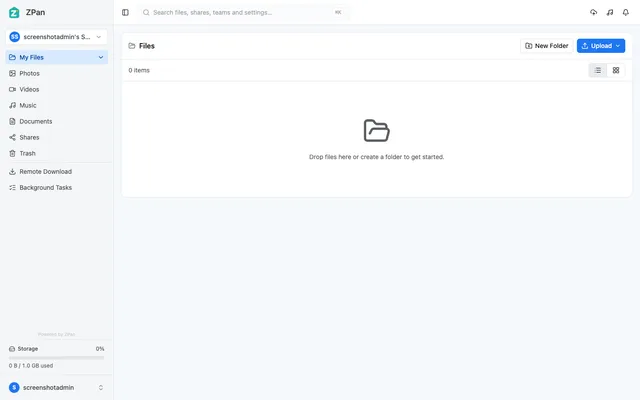
  • ZPan file browser with media filters, shares, trash, remote download and a storage quota bar

    Web drive and image host for your own S3-compatible bucket, with share links, WebDAV and team spaces
    Deploy
    Manual
    License
    AGPL-3.0
    GitHub stars
    2.1k stars
    Last commit
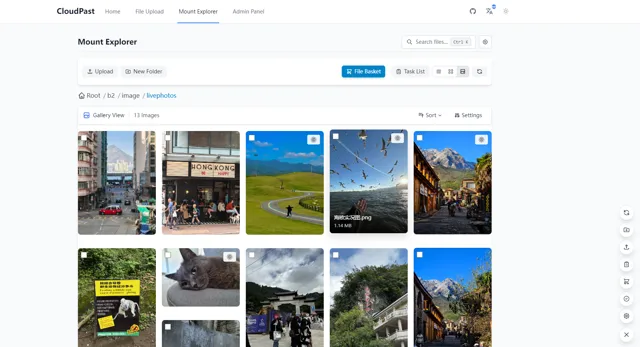
  • CloudPaste Mount Explorer in gallery view, showing photo thumbnails from a Backblaze B2 folder

    Markdown pastebin and multi-storage file manager on Cloudflare Workers, mountable as a WebDAV drive
    Deploy
    Manual
    License
    Apache-2.0
    GitHub stars
    2.7k stars
    Last commit
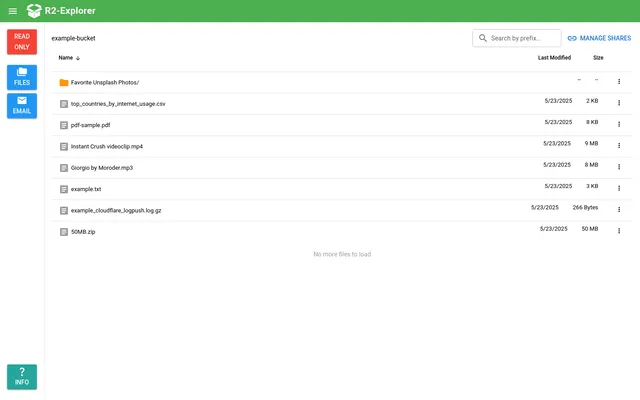
  • R2-Explorer demo listing an R2 bucket's folder and files with dates and sizes, in read-only mode

    Google Drive-style file manager for an R2 bucket, with uploads, previews and password-protected share links

    Deploy
    One-click
    License
    MIT
    GitHub stars
    651 stars
    Last commit

Google Drive features, app by app

FeatureZPanCloudPasteR2-Explorer
Store and organize files in folders from any browserYesYesYes
Upload files and foldersYesYesYes
Preview documents, images, PDFs and video in the browserYesYesPartly
Share files or folders by link with access controlsYesYesPartly
Search for filesYesYesPartly
Shared spaces for teamsYesPartlyNo
Real-time co-editing of documentsNoNoNo
Desktop and mobile apps that sync filesPartlyPartlyNo

Web drive and image host for your own S3-compatible bucket, with share links, WebDAV and team spaces

What a Google Drive user would miss
Real-time document co-editing and a sync client.
What it adds
Files go to your own S3-compatible bucket such as R2, uploads skip the Worker, and screenshot tools like PicGo and ShareX can upload to it as an image host.
  • Yes Store and organize files in folders from any browser. Web file manager with folders, move, rename and copy.
  • Yes Upload files and folders. Browsers upload straight to the bucket through presigned URLs, with multipart for large files.
  • Yes Preview documents, images, PDFs and video in the browser. Image, video, audio and document previews.
  • Yes Share files or folders by link with access controls. Share links with password, expiry and download limit, plus direct links.
  • Yes Search for files. Search listed beside folders, previews and trash.
  • Yes Shared spaces for teams. Team spaces with their own members, roles, files and quotas.
  • No Real-time co-editing of documents. README says it is not a co-editing suite.
  • Partly Desktop and mobile apps that sync files. WebDAV mount in desktop clients; dedicated sync clients are marked planned.

Sources:github.com/saltbo/zpan#readmezpan.space/docs/user-guide/files-and-folders/workspace.google.com/products/drive/

Markdown pastebin and multi-storage file manager on Cloudflare Workers, mountable as a WebDAV drive

What a Google Drive user would miss
Co-editing, a sync client and per-person accounts, since access is one admin plus scoped API keys.
What it adds
It mounts R2, B2, S3, OneDrive, Google Drive, WebDAV and other storages side by side in one explorer.
  • Yes Store and organize files in folders from any browser. File explorer over mounted storages with browse, rename, move, copy and directory operations.
  • Yes Upload files and folders. Drag and drop, batch and chunked resumable uploads.
  • Yes Preview documents, images, PDFs and video in the browser. 30+ formats including images, video, audio, PDF and Office files.
  • Yes Share files or folders by link with access controls. Per-file and per-directory password, expiry and access limits.
  • Yes Search for files. Search index per mount point.
  • Partly Shared spaces for teams. API keys limited to storage paths for separate spaces; no per-user accounts.
  • No Real-time co-editing of documents. Not listed.
  • Partly Desktop and mobile apps that sync files. WebDAV mount in desktop and mobile clients; no sync client.

Sources:doc.cloudpaste.qzz.io/en/guide/featuresdoc.cloudpaste.qzz.io/en/guide/mount-managementdoc.cloudpaste.qzz.io/en/guide/index-managementgithub.com/ling-drag0n/CloudPaste#readme

Google Drive-style file manager for an R2 bucket, with uploads, previews and password-protected share links

What a Google Drive user would miss
Real-time co-editing, sync apps and per-person sharing permissions.
What it adds
Files stay in an R2 bucket in your own Cloudflare account, and the app can also show mail received through Email Routing.
  • Yes Store and organize files in folders from any browser. Folders, right-click actions and an R2 bucket behind a browser dashboard; folder renaming is still on the roadmap.
  • Yes Upload files and folders. Drag and drop, multipart uploads and folder upload.
  • Partly Preview documents, images, PDFs and video in the browser. PDF, images, text, Markdown, CSV and Logpush files; Office documents and video are not listed.
  • Partly Share files or folders by link with access controls. Single-file links with optional password, expiry and download limit; no folder sharing or named-person permissions.
  • Partly Search for files. Prefix search added in v1.1.14; the README roadmap still lists file search.
  • No Shared spaces for teams. Basic Auth users or Cloudflare Access, with no per-user spaces or permissions.
  • No Real-time co-editing of documents. Text files can be edited in place only.
  • No Desktop and mobile apps that sync files. Browser dashboard only.

Sources:github.com/g4brym/r2-explorer#readmegithub.com/G4brym/R2-Explorer/releases/tag/v1.1.14workspace.google.com/products/drive/