
Skip to content

Self-hosted alternatives to UptimeRobot

UptimeRobot is a hosted service that checks websites, ports, keywords and cron jobs for downtime, sends alerts and publishes status pages. Three listed apps do its main job and run in your own Cloudflare account.

Each answer comes from the app’s README and source code, compared with the features UptimeRobot describes on its own site.

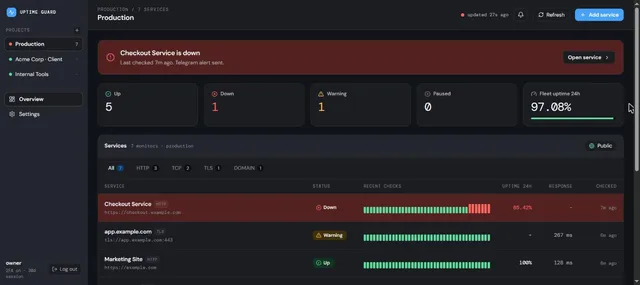
  • Uptime Guard dashboard for a Production project with one service down, one warning and the recent checks of each service

    Uptime monitor for websites, ports, DNS, certificates and cron jobs, with Telegram alerts and public status pages
    Deploy
    One-click
    License
    MIT
    GitHub stars
    29 stars
    Last commit
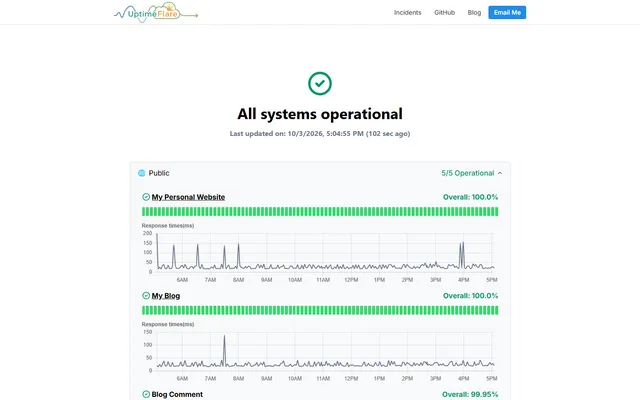
  • UptimeFlare status page reporting all systems operational, with daily uptime bars and response-time charts

    Serverless uptime monitor and status page with HTTP, TCP and keyword checks, deployed through GitHub Actions
    Deploy
    Manual
    License
    Apache-2.0
    GitHub stars
    3.9k stars
    Last commit
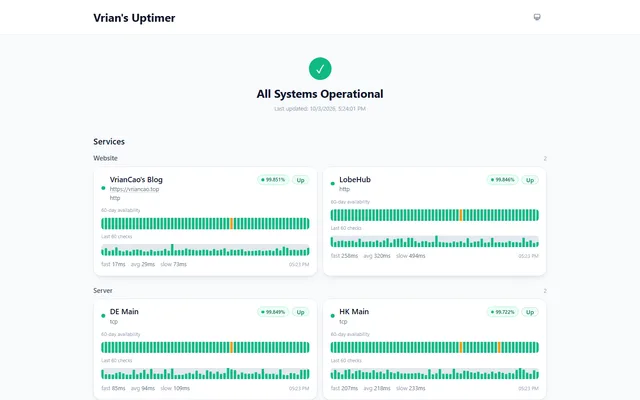
  • Uptimer public status page with website and server monitors, 60-day availability bars and latency of the last 60 checks

    Uptime monitor and status page with HTTP and TCP checks, incidents and webhook alerts, on Workers, Pages and D1

    Deploy
    Manual
    License
    MIT
    GitHub stars
    481 stars
    Last commit

UptimeRobot features, app by app

FeatureUptime GuardUptimeFlareUptimer
HTTP(S) website and API monitoring with response timesYesYesYes
Keyword monitoringYesYesYes
Ping and TCP port monitoringPartlyPartlyPartly
Cron job (heartbeat) monitoringYesNoNo
SSL certificate and DNS record monitoringYesNoNo
Checks from multiple locationsNoPartlyNo
Alerts by email, Slack, webhook and pushPartlyPartlyPartly
Public status pagesPartlyYesYes

Uptime monitor for websites, ports, DNS, certificates and cron jobs, with Telegram alerts and public status pages

What a UptimeRobot user would miss
It has no ICMP ping, no multi-location checks, alerts only through Telegram and browser push, and a basic public status page.
What it adds
It also checks domain registration expiry and runs multi-step script checks, sign-in needs a password and an authenticator code, and data stays in your Cloudflare account.
  • Yes HTTP(S) website and API monitoring with response times. HTTP checks with a status range; response time is recorded per check.
  • Yes Keyword monitoring. Optional body keyword present or absent, or a JSON field value.
  • Partly Ping and TCP port monitoring. TCP port checks; no ICMP ping.
  • Yes Cron job (heartbeat) monitoring. Heartbeat monitors with a unique /ping URL and a grace window.
  • Yes SSL certificate and DNS record monitoring. TLS certificate expiry, domain expiry and DNS record checks.
  • No Checks from multiple locations. Checks run from the Worker with no location choice.
  • Partly Alerts by email, Slack, webhook and push. Telegram and Web Push only; email, Slack and Discord are on the roadmap.
  • Partly Public status pages. Read-only public page per project with each monitor's status and 90-day uptime; no incident posts.

Sources:github.com/calmray-solutions/uptime-guard#readmegithub.com/calmray-solutions/uptime-guard/blob/main/worker/src/checks.tsgithub.com/calmray-solutions/uptime-guard/blob/main/worker/src/index.ts

Serverless uptime monitor and status page with HTTP, TCP and keyword checks, deployed through GitHub Actions

What a UptimeRobot user would miss
It has no heartbeat or certificate checks, monitors are defined in a config file rather than a dashboard, and alerts go only through webhooks.
What it adds
A monitor can run from a chosen region, the status page can be password protected, and a single monitor can be embedded in another page.
  • Yes HTTP(S) website and API monitoring with response times. HTTP(S) checks with custom method, headers, body and expected status codes.
  • Yes Keyword monitoring. ResponseKeyword and responseForbiddenKeyword options.
  • Partly Ping and TCP port monitoring. TCP port checks; no ICMP ping.
  • No Cron job (heartbeat) monitoring. No heartbeat monitor type.
  • No SSL certificate and DNS record monitoring. SSL certificate checks are unchecked on the README roadmap; no DNS checks.
  • Partly Checks from multiple locations. A monitor can run from a chosen region through a check proxy that you set up.
  • Partly Alerts by email, Slack, webhook and push. Webhook only, with a grace period; no built-in email.
  • Yes Public status pages. Status page with groups, incident history, scheduled maintenance, own domain through a CNAME and an optional password.

Sources:github.com/lyc8503/uptimeflare#featuresgithub.com/lyc8503/UptimeFlare/blob/main/uptime.config.tsgithub.com/lyc8503/UptimeFlare/wiki/Setup-notification

Uptime monitor and status page with HTTP and TCP checks, incidents and webhook alerts, on Workers, Pages and D1

What a UptimeRobot user would miss
It has no heartbeat, certificate, DNS or ping monitors and no multi-location checks, and alerts go only through webhooks and Telegram.
What it adds
Webhook messages use templates and can carry an HMAC-SHA256 signature, and uptime and latency history can be exported as CSV.
  • Yes HTTP(S) website and API monitoring with response times. HTTP(S) probes with headers, body and status code allow or deny lists; per-monitor interval from 60 seconds.
  • Yes Keyword monitoring. Keyword assertions on the response.
  • Partly Ping and TCP port monitoring. TCP port checks; no ICMP ping.
  • No Cron job (heartbeat) monitoring. No heartbeat monitor type.
  • No SSL certificate and DNS record monitoring. No certificate or DNS checks.
  • No Checks from multiple locations. Probes run from the cron Worker with no location choice.
  • Partly Alerts by email, Slack, webhook and push. Webhooks to Discord, Slack, ntfy or any URL, plus a Telegram preset; no email.
  • Yes Public status pages. Public status page with uptime, latency charts, incidents and maintenance windows.

Sources:github.com/vriancao/uptimer#featuresgithub.com/VrianCao/Uptimer/blob/master/docs/notifications.mdgithub.com/VrianCao/Uptimer/blob/master/apps/worker/src/schemas/incidents.ts