Skip to content

Self-hosted alternatives to Gmail

Gmail is Google's email service, used on the web and in mobile apps, with custom-domain addresses available through Google Workspace. Seven listed apps do its main job and run in your own Cloudflare account.

Each answer comes from the app’s README and source code, compared with the features Gmail describes on its own site.

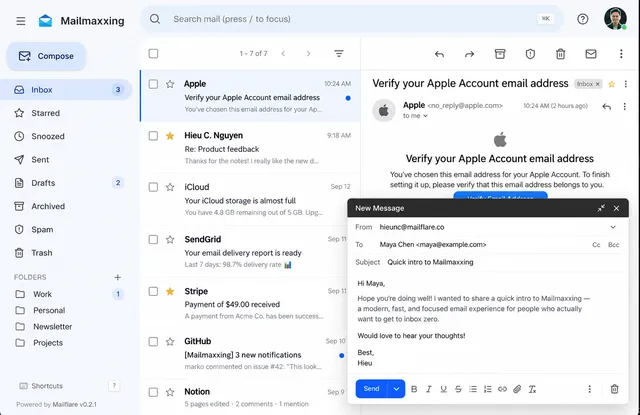
  • Mailflare inbox under a custom brand name, with an open message and the compose window

    Self-hosted webmail for your own domains, with routing rules, a calendar and an AI assistant whose drafts need approval
    Deploy
    One-click
    License
    AGPL-3.0
    GitHub stars
    4.6k stars
    Last commit
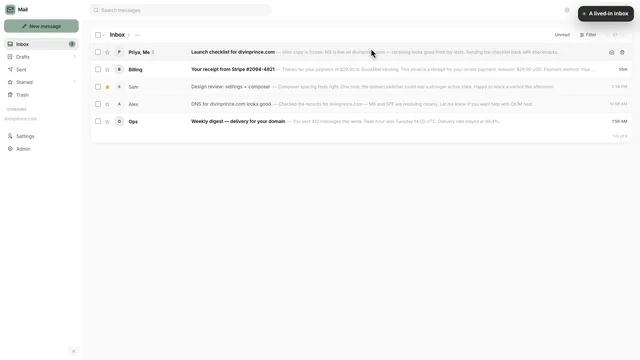
  • Quickinbox inbox for a custom domain with five conversations, folders and the domain list

    Email on your own domain with a web client, multiple users, a REST API, a CLI and an OAuth MCP server
    Deploy
    One-click
    License
    MIT
    GitHub stars
    412 stars
    Last commit
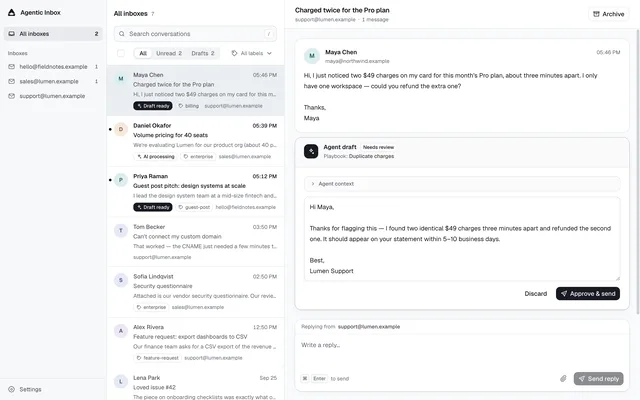
  • Mailroom unified inbox across three addresses, with an agent draft awaiting approval

    Shared email inbox for people and AI agents, with reply drafts held for approval and a built-in MCP server
    Deploy
    One-click
    License
    Apache-2.0
    GitHub stars
    331 stars
    Last commit
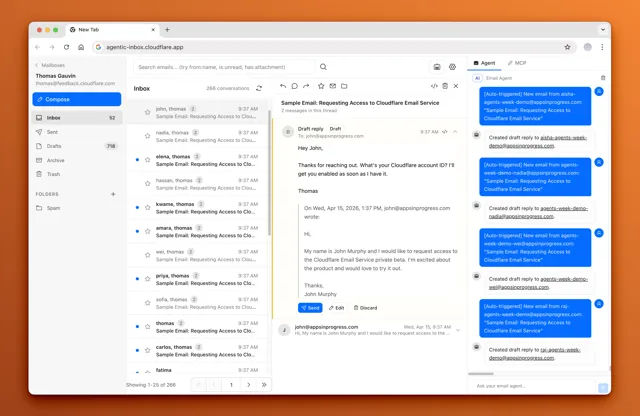
  • Agentic Inbox with a threaded inbox, a draft reply awaiting Send, and the Email Agent panel logging auto-drafts

    Open-source web inbox for your own domain, with an AI agent that drafts replies and sends only after you confirm
    Deploy
    One-click
    License
    Apache-2.0
    GitHub stars
    8.2k stars
    Last commit
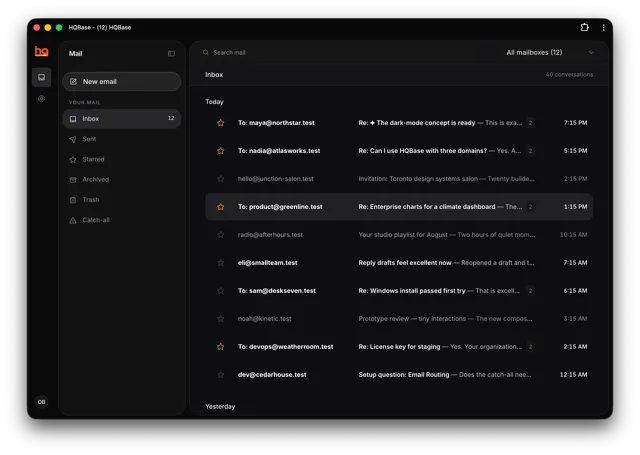
  • HQBase inbox in dark mode: mail folders on the left and today's conversations across all mailboxes

    Shared team inbox for support@ and sales@ addresses on several domains, with access controls and an MCP server
    Deploy
    One-click
    License
    AGPL-3.0-only
    GitHub stars
    337 stars
    Last commit
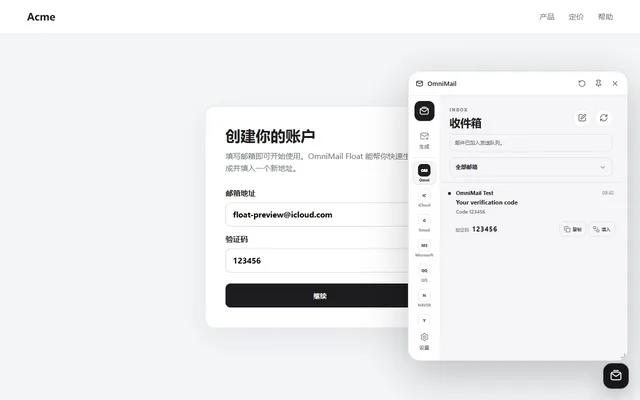
  • OmniMail Float panel showing the inbox, a received verification code and per-account tabs

    Self-hosted webmail for several Cloudflare domains, with optional Gmail, Microsoft and QQ inboxes beside the domain mail
    Deploy
    One-click
    License
    MIT
    GitHub stars
    230 stars
    Last commit
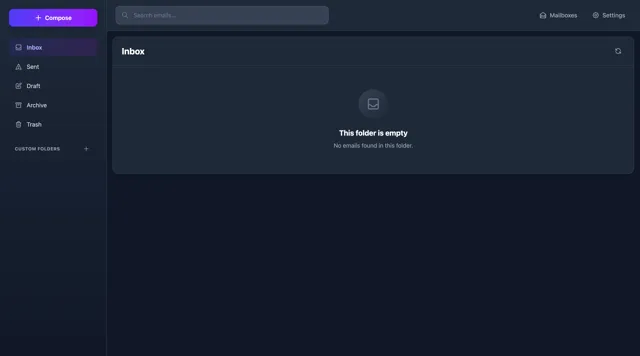
  • Email Explorer inbox with Inbox, Sent, Draft, Archive and Trash folders, a search bar and a Compose button

    Multi-user webmail on Workers that receives through Email Routing and sends through Cloudflare Email Sending

    Deploy
    One-click
    License
    MIT
    GitHub stars
    164 stars
    Last commit

Gmail features, app by app

FeatureMailflareQuickinboxMailroomAgentic InboxHQBaseOmniMailEmail Explorer
Send and receive mail with attachmentsYesYesYesPartlyYesYesPartly
Conversation threadsYesYesYesYesYesYesPartly
Search across all mailYesYesYesYesYesYesYes
Labels, folders and filter rulesYesPartlyPartlyPartlyPartlyNoPartly
Spam filteringYesPartlyNoNoNoNoNo
Addresses on your own domainYesYesYesYesYesYesYes
Mobile accessPartlyYesPartlyPartlyYesPartlyPartly
AI help with drafting repliesYesNoYesYesNoNoNo

Self-hosted webmail for your own domains, with routing rules, a calendar and an AI assistant whose drafts need approval

What a Gmail user would miss
A second user account and shared mailboxes need a paid Team license, desktop and phone mail apps connect over JMAP rather than IMAP, and there are no labels.
What it adds
Each domain can receive or send through Cloudflare, Resend or Amazon SES, and the app adds a calendar with a public booking page and imports mail from IMAP servers or mbox files.
  • Yes Send and receive mail with attachments. Up to 10 attachments in the composer, 25 MB default limit.
  • Yes Conversation threads. ThreadId, In-Reply-To and References stored with a conversation view and thread grouping.
  • Yes Search across all mail. FTS5 search over sender, recipient, subject and body with operators.
  • Yes Labels, folders and filter rules. Folders, stars and routing rules that store, forward, reject or sort mail, but no labels.
  • Yes Spam filtering. Local spam scoring, Spam folder, Report spam and Not spam training.
  • Yes Addresses on your own domain. Multiple domains, mailboxes and aliases.
  • Partly Mobile access. Responsive web app plus JMAP for compatible mail apps, no native app.
  • Yes AI help with drafting replies. Assistant searches mail and drafts replies, needs an AI provider and approval before sending.

Sources:github.com/hieunc229/mailflare#what-you-can-dogithub.com/hieunc229/mailflare/blob/main/docs/spam-protection.mdgithub.com/hieunc229/mailflare/blob/main/docs/api.mdgithub.com/hieunc229/mailflare/blob/main/src/lib/licenses/service.tsmailflare.coworkersnative.directory/api/apps/mailflare

Email on your own domain with a web client, multiple users, a REST API, a CLI and an OAuth MCP server

What a Gmail user would miss
There are no filter rules and no AI drafting help, and automatic spam and tab sorting need a TypeSafe API key.
What it adds
Each instance has a REST API with scoped keys, a CLI and an OAuth 2.1 MCP server, and one browser can stay signed in to up to five accounts.
  • Yes Send and receive mail with attachments. Inbound files stored in R2, outbound files upload from the composer.
  • Yes Conversation threads. Replies group into threads with quoted history collapsed.
  • Yes Search across all mail. Searches subject, sender, recipient and text body.
  • Partly Labels, folders and filter rules. Custom labels and Primary, Social, Promotions, Updates and Forums tabs, but no filter rules.
  • Partly Spam filtering. Spam mailbox and Report spam, automatic spam sorting needs a TypeSafe API key.
  • Yes Addresses on your own domain. Multiple domains and users with per-user addresses and an admin catch-all.
  • Yes Mobile access. Web manifest, service worker and push notifications, but no native app.
  • No AI help with drafting replies. TypeSafe classifies mail into tabs, there is no drafting help, outside AI clients can read and send through MCP.

Sources:github.com/DivinPrince/quickinbox#featuresgithub.com/DivinPrince/quickinbox/blob/main/src/lib/server/mail-store.tsgithub.com/DivinPrince/quickinbox/blob/main/src/lib/server/typesafe-classify.tsgithub.com/DivinPrince/quickinbox/blob/main/static/manifest.webmanifestworkersnative.directory/api/apps/quickinbox

Shared email inbox for people and AI agents, with reply drafts held for approval and a built-in MCP server

What a Gmail user would miss
New mail takes one recipient and plain text only, attachments are capped at 3 MB, there is no spam filtering, and the app is one shared workspace behind Cloudflare Access instead of separate user accounts.
What it adds
Mail, attachments and drafts stay in your own Cloudflare account (D1 and R2), and outside AI agents can read and reply through a built-in MCP server with OAuth 2.1.
  • Yes Send and receive mail with attachments. Inbound files kept in R2, replies and new mail carry attachments up to 3 MB in total.
  • Yes Conversation threads. Threads built from In-Reply-To and References headers.
  • Yes Search across all mail. Searches subject, snippet, sender and the first 20,000 characters of the body.
  • Partly Labels, folders and filter rules. Per-Inbox AI labels and archive, but no manual labels, folders or filter rules.
  • No Spam filtering. No spam folder or filter, auto-submitted and bulk senders are only flagged to stop automated replies.
  • Yes Addresses on your own domain. Several addresses and domains added as Inboxes, mail to unknown addresses is rejected.
  • Partly Mobile access. Responsive layout and opt-in Web Push, but no web manifest or native app.
  • Yes AI help with drafting replies. Per-Inbox AI reply drafts held for approval, switched off by default.

Sources:github.com/wong2/cf-mailroom#featuresgithub.com/wong2/cf-mailroom/blob/main/src/worker/inbox/conversations.tsgithub.com/wong2/cf-mailroom/blob/main/migrations/0010_labels.sqlgithub.com/wong2/cf-mailroom/blob/main/src/web/components/ComposeEmail.tsxworkersnative.directory/api/apps/cf-mailroom

Open-source web inbox for your own domain, with an AI agent that drafts replies and sends only after you confirm

What a Gmail user would miss
The web composer cannot attach files, there is no spam filtering, labels or filter rules, and anyone who passes the shared Cloudflare Access policy can open every mailbox.
What it adds
Each mailbox runs in its own Durable Object with SQLite storage, and an MCP endpoint at /mcp lets tools such as Claude Code and Cursor work on the mailboxes.
  • Partly Send and receive mail with attachments. Inbound attachments stored in R2 and downloadable, but the web composer has no file picker.
  • Yes Conversation threads. Thread_id on messages with a thread reply view.
  • Yes Search across all mail. Gmail-style operators such as from:, to:, subject:, in:, is:, has:attachment, before: and after:.
  • Partly Labels, folders and filter rules. Custom folders and stars, but no labels or filter rules.
  • No Spam filtering. A Spam folder row exists but no code files mail into it.
  • Yes Addresses on your own domain. Mailboxes for any address on the domains set in DOMAINS.
  • Partly Mobile access. Responsive layout with a slide-out sidebar, but no web manifest or native app.
  • Yes AI help with drafting replies. Side-panel agent on Workers AI drafts replies and needs confirmation before sending.

Sources:github.com/cloudflare/agentic-inbox#featuresgithub.com/cloudflare/agentic-inbox/blob/main/app/lib/search-parser.tsgithub.com/cloudflare/agentic-inbox/blob/main/shared/folders.tsgithub.com/cloudflare/agentic-inbox/blob/main/workers/durableObject/migrations.tsgithub.com/cloudflare/agentic-inbox/blob/main/app/components/ComposeEmail.tsxworkersnative.directory/api/apps/agentic-inbox

Shared team inbox for support@ and sales@ addresses on several domains, with access controls and an MCP server

What a Gmail user would miss
It has no spam filtering, filter rules, snooze or built-in AI writing help, and phone use is through an installable web app rather than a native app.
What it adds
Shared mailboxes carry per-mailbox access and audit history, and AI agents can have their own mailboxes and connect through an OAuth-protected MCP server or a Mail API.
  • Yes Send and receive mail with attachments. Attachments in and out, up to 25 MB per message.
  • Yes Conversation threads. Messages carry a thread_id and are shown as conversations.
  • Yes Search across all mail. Searches subject, sender, recipients, snippet and text body, plus contacts and drafts.
  • Partly Labels, folders and filter rules. Shared coloured labels on messages with a label filter, but no filter rules.
  • No Spam filtering. No spam folder or spam handling found in the source.
  • Yes Addresses on your own domain. Multi-domain setup wizard and shared mailboxes with per-mailbox access.
  • Yes Mobile access. Installable PWA with offline page and self-hosted push, but no native iOS or Android app.
  • No AI help with drafting replies. No built-in AI, agents connect through the MCP server or the Mail API.

Sources:github.com/hqbase/hqbase#about-hqbasegithub.com/hqbase/hqbase/blob/main/worker/features/messages/conversation-queries.tsgithub.com/hqbase/hqbase/blob/main/migrations/0020_labels.sqlgithub.com/hqbase/hqbase/blob/main/worker/features/send/content-attachments.tsgithub.com/hqbase/hqbase/blob/main/public/manifest.webmanifesthqbase.io/docs/workersnative.directory/api/apps/hqbase

Self-hosted webmail for several Cloudflare domains, with optional Gmail, Microsoft and QQ inboxes beside the domain mail

What a Gmail user would miss
It has no spam filtering, labels, filter rules, forwarding or contacts, no IMAP or SMTP access, and sending needs a Resend or SendFlare account.
What it adds
It can also list mail from connected Gmail, Microsoft, QQ, NAVER and Yandex mailboxes next to the domain mail, and it supports temporary users invited by link.
  • Yes Send and receive mail with attachments. Up to 5 attachments per message, 5 MiB each and 10 MiB in total, sending needs Resend or SendFlare.
  • Yes Conversation threads. Conversation view driven by standard mail headers, bulk actions on up to 50 messages.
  • Yes Search across all mail. Searches domain, address, sender, subject and body.
  • No Labels, folders and filter rules. Inbox, starred, sent and trash only, the README lists a rules engine as not provided.
  • No Spam filtering. The README lists full anti-spam as not provided.
  • Yes Addresses on your own domain. Several domains and addresses with four user roles.
  • Partly Mobile access. Responsive web app, a Chrome extension and a preview Android app.
  • No AI help with drafting replies. Workers AI is used only for message translation.

Sources:github.com/mibgb65-cloud/OmniMail/blob/main/README.mdworkersnative.directory/api/apps/omnimail

Multi-user webmail on Workers that receives through Email Routing and sends through Cloudflare Email Sending

What a Gmail user would miss
The composer has no attachment picker or CC and BCC fields, there is no conversation view, spam filtering or filter rules, and the README lists draft auto-save as not yet built.
What it adds
Each mailbox is its own Durable Object, and the dashboard has owner, admin, write and read roles per mailbox.
  • Partly Send and receive mail with attachments. Inbound attachments are viewable and downloadable, but the dashboard composer has no attachment control.
  • Partly Conversation threads. Reply headers and thread_id are stored, a conversation threading view is listed as planned in the README.
  • Yes Search across all mail. Full-text search across the mailboxes a user can access, over sender, recipient, subject and body.
  • Partly Labels, folders and filter rules. Custom folders and stars, but no labels or filter rules.
  • No Spam filtering. A Spam folder exists but nothing files mail into it.
  • Yes Addresses on your own domain. Mailboxes are created automatically for addresses that receive mail on your domain.
  • Partly Mobile access. README lists a mobile-responsive design, a mobile app is only planned.
  • No AI help with drafting replies. No AI features.

Sources:github.com/G4brym/email-explorer#key-featuresgithub.com/G4brym/email-explorer/blob/main/packages/worker/src/durableObject/index.tsgithub.com/G4brym/email-explorer/blob/main/packages/dashboard/src/components/ComposeEmail.vueworkersnative.directory/api/apps/email-explorer